Dieser Wunsch wurde umgesetzt
I just installed v1.16.1. I get an alarm the past several nights at exactly 00:00 even though the associated calendar event earlier occurs in the day (and is not an all day event).
Thank you for the report, and sorry for the trouble.
We're looking into why an alarm goes off at exactly 00:00 when the event is earlier in the day and isn't an all-day event. We'll investigate and fix it, and post an update here once we have more.
Thanks again for reporting this. Version 1.16.2 is now available on the App Store.
We weren't able to reproduce the midnight alarm on our side, so this update adds safeguards rather than a confirmed fix. Alarms that never rang at their scheduled time are now cleared so they can't go off later, and if the system holds an alarm for a different time than the one the app set, the app sets it again at the correct time. The details are in the 1.16.2 changelog linked above.
If you still get an alarm at 00:00 after updating to 1.16.2, please let us know here and we'll keep looking into it.
thank you! I will install it and let you know.
I have 1.16.2. Last night calsyncalarm fired an alarm at midnight for an event which was on my calendar for earlier that day. This event occurs every 2 weeks on Saturday at 9 am. I have screenshots, if that helps.
Thank you again for trying 1.16.2 and letting us know, and for offering the screenshots. We're looking further into why the alarm still goes off at midnight, including how it happens with a repeating event like yours. Please give us a little time; we'll post an update here once we know more. We may ask for the screenshots then, so please keep them if you can.
Following up on our last message: you can now attach images to comments here. Use the picture icon at the right end of the toolbar above the comment box (you can also paste an image in). If you still have the screenshots, we'd be grateful if you could share them.
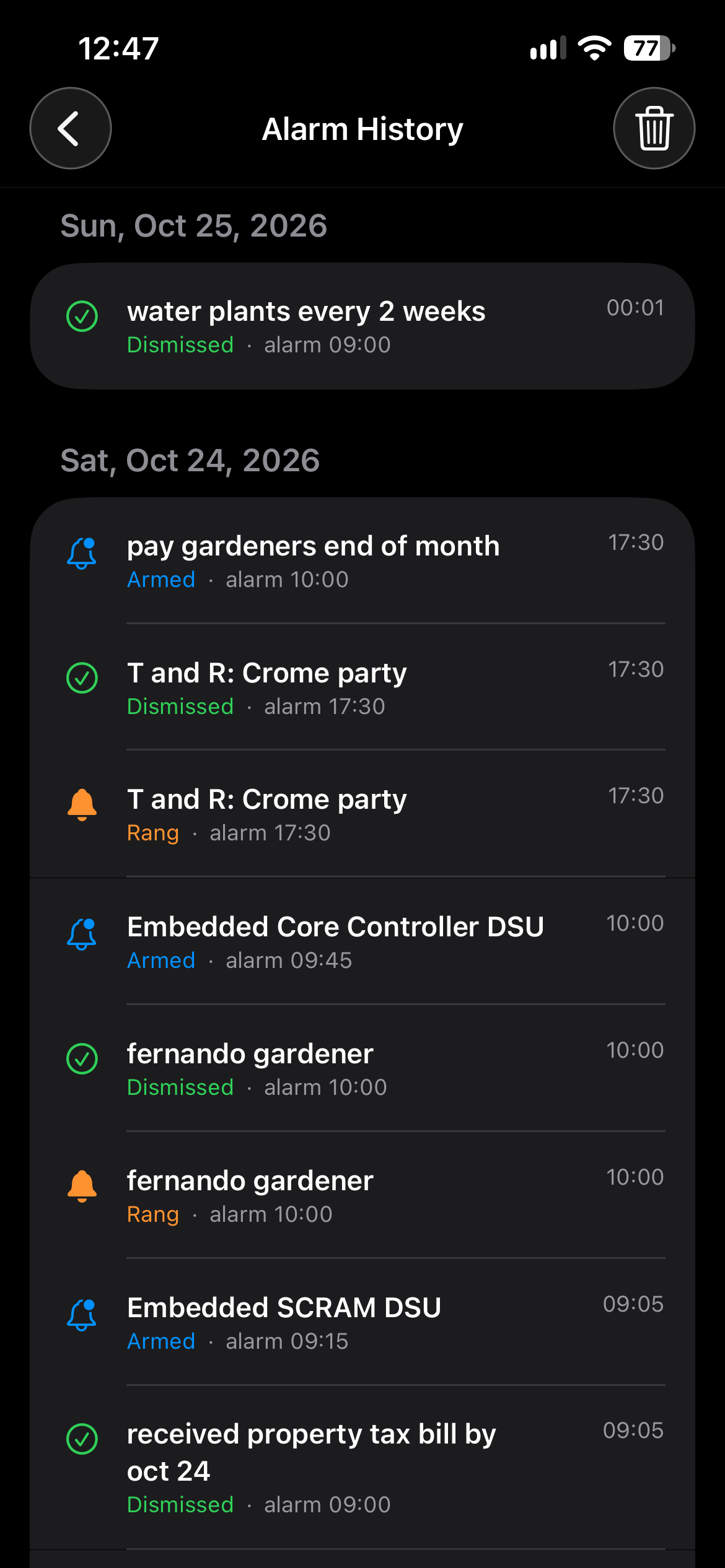
The most useful one is the Alarm History screen (the clock icon at the top right of the Upcoming Alarms list), showing Saturday the 24th and Sunday the 25th. Each line shows which alarm time it belongs to and, on the right, when it was recorded, so we can see whether the alarm also rang that morning and what the midnight one was. Feel free to hide any event names you'd rather not share. A screenshot of the alarm itself at midnight is welcome too, if you took one.
alarm history: I only have sunday
here's my actual calendar entry for saturday
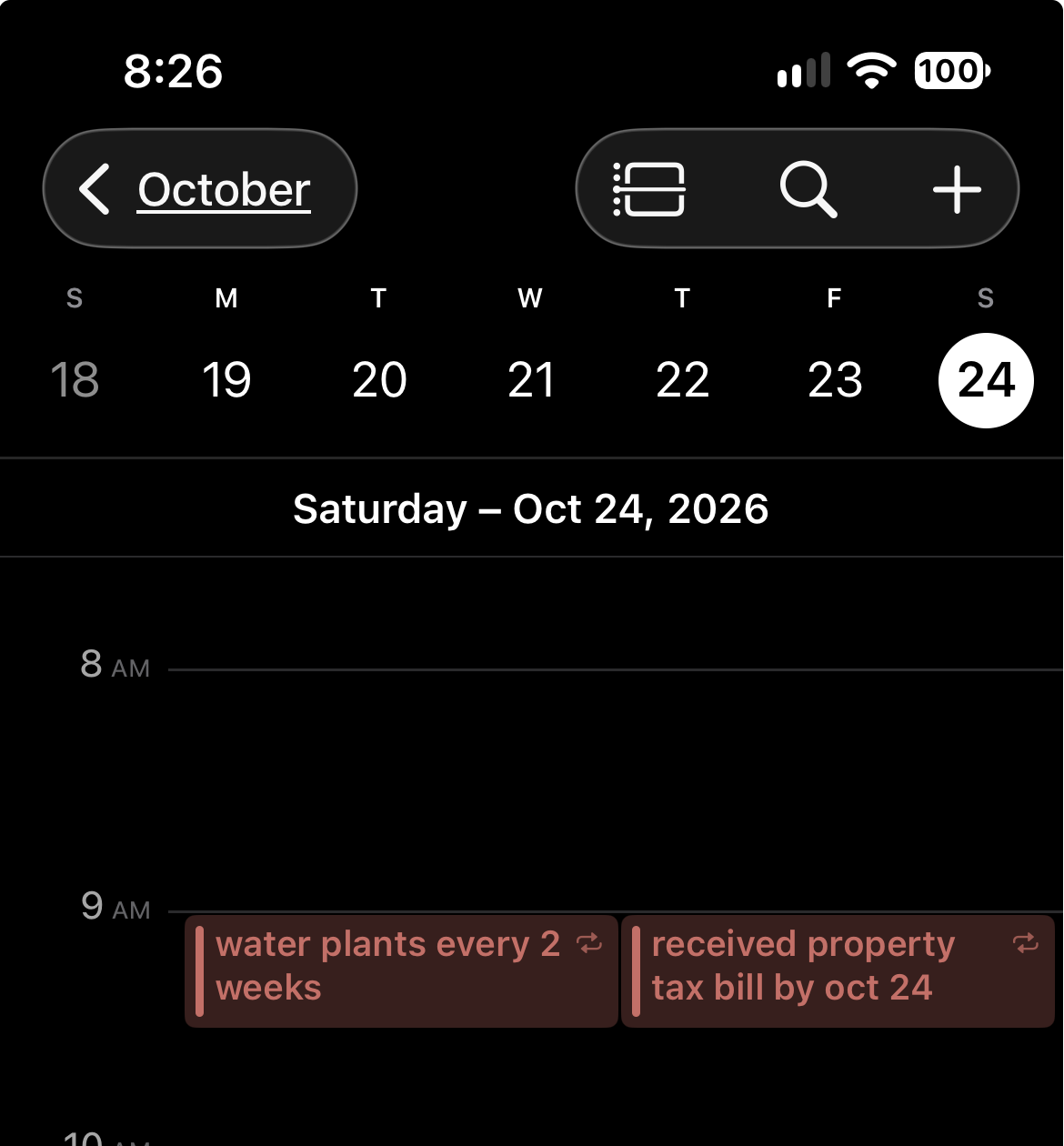
Thank you so much for the screenshots. They help a lot. Seeing your alarm history together with the two events at 9 am on Saturday gave us a clear lead, and we're now testing it on our side. We'll post an update here once we know more.
Thank you so much for reporting this, and for taking the time to send the screenshots. Your alarm history and the calendar entry showing two events at 9 am on Saturday were exactly what we needed. With them, we were able to reproduce the midnight alarm on our side.
Here is what was happening: when two alarms from the app go off at the same time, only one of them appears on screen. The other one stays active without being shown, and when the date changes at midnight, the system brings it back, so it rings at 00:00. This matches what you saw with your two 9 am events.
Version 1.16.3 is now available on the App Store and fixes this. Events that start at the same time now share a single alarm, labeled like "+1 more · Event name", so your two Saturday events will ring as one alarm. Also, if another alarm goes off while one is still ringing, stopping the alarm on screen now stops the hidden one too. The details are in the 1.16.3 changelog linked above.
We really appreciate your patience while we looked into this, and all the help you gave us along the way. We couldn't have found the cause without your report. If you still get an alarm at midnight after updating to 1.16.3, please let us know here.
thank you for being so responsive. I will download 1.16.3 and try it.